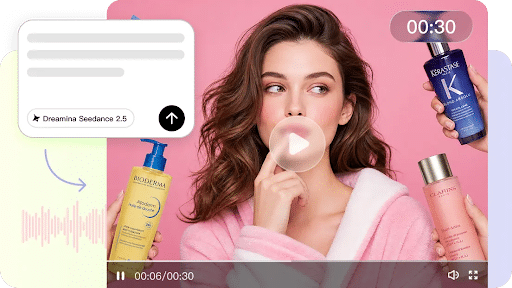
To produce compelling AI-generated videos, it is essential to have proper prompts. Better prompts lead to better scene accuracy, motion, pacing, and storytelling. Advanced scene guidance, reference inputs, and flexible editing tools help Pippit create structured prompts. By carefully planning the generation process first, unnecessary revisions can be avoided, and polished videos can be created that meet creative expectations in marketing, educational, and storytelling projects.
Why Smarter Prompts Produce Better AI Videos
The key to every successful AI video starts with precise creative direction. Subject, actions, atmosphere, style, and mood are clearly communicated through prompts. This helps minimize the random change of scenes and enhances continuity between linked moments. In addition, consistent instructions help to maintain the appearance of characters, the placement of objects, and the lighting through each sequence. Organized prompts promote good storytelling because each step is a logical progression. The better you plan, the cleaner your transition will be, and the more reliable your output. Good prompt writing can save time in editing and enhance the efficiency of the video production in various video styles.
Build Prompt Structure Before Writing Detailed Instructions
Using planning prompt structure sets up a solid base prior to putting detailed instructions into Pippit. Start with subject, main action, setting, lighting, and style of art, then put events in chronological order to make them flow. Use camera framing to create a seamless visual storytelling experience. Discuss close-ups, long shots, tracking, and overhead shots if needed. Include visual targets rather than ambiguous words. Structured prompts effectively guide the entire video creation process, making AI video generator more effective.

Steps to Make Every Prompt Count with Smarter Control in Seedance 2.5
Step 1: Create a smart video prompt
- Sign up for Pippit using your Google, TikTok, or Facebook account details.
- Open the “More” tab from the left vertical menu bar and select “Video generator”.
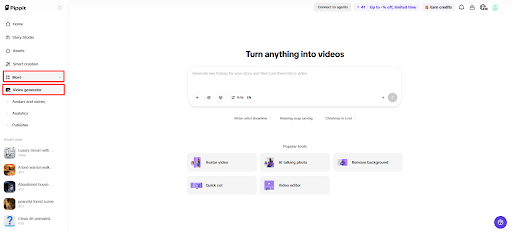
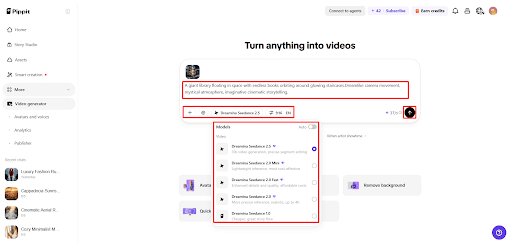
3.Choose “Dreamina Seedance 2.5” as your AI model.
4. Enter a detailed text prompt explaining the subject, movements, camera style, and expected result.
5. Select video length, language, subtitles, and aspect ratio.
6. Click “+” to upload reference images or videos from your device, phone, Dropbox, or a link. You can also select assets if you do not have reference media.
7. Click “Generate” after adding your prompt and references.
Step 2: Generate a controlled AI video
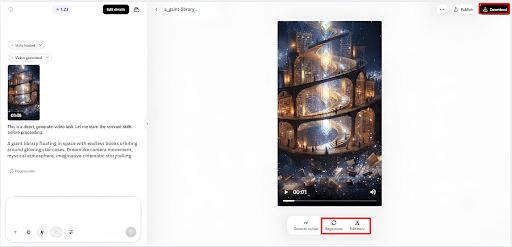
- After clicking “Generate”, Pippit’s AI video generator creates a video based on your instructions and reference media.
- The AI manages transitions, pacing, captions, avatars, voice, lyrics, and visual enhancements.
- You will receive a video draft to check.
Step 3: Refine and export
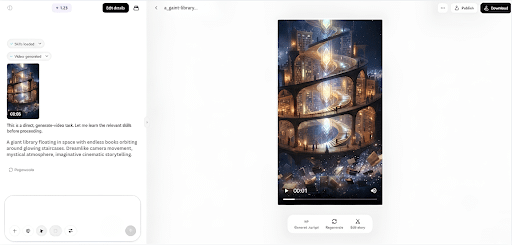
- Click the “Download” tab in the top right corner to save the video. You can also select “Regenerate” or click “Edit more” below the video for extra customization.
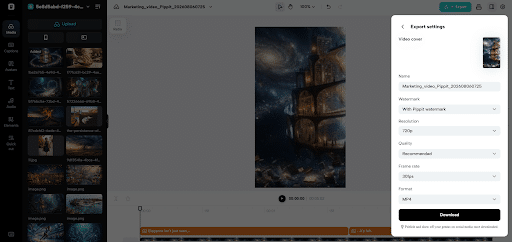
2. Edit captions manually, add text, and adjust size, color, alignment, filters, and effects.
3. Add background music, remove backgrounds, and fine-tune visuals.
4. Click “Export” in the top right corner.
5. Select “Publish” to post directly on TikTok, Instagram, or Facebook, or click “Download” to save the video with your preferred format, resolution, frame rate, and quality.
Use Seedance 2.5 Controls for More Accurate Results
Pippit Seedance 2.5 introduces more sophisticated controls, allowing users to achieve greater precision in their video production. Timestamp prompts help to mark key story beats more accurately. Specific action directions are provided in some of the moments, which makes scenes move more smoothly. There are multi-modal reference images and/or videos to support visual consistency, relevant to intended styles. Realistic movement, natural interaction with objects, and cinematic camera positions are all director-inspired camera logic. Continuity can be maintained with extensions of scenes for longer stories. Seamless linking provides visual continuity, and campaigns, product presentations, and creative stories are more complete, polished, and well-rounded from beginning to end.
Essential Elements Every Effective Prompt Should Include
All good prompts have a consistent format that ensures instructions are well organized and easy to understand. Add these key components prior to creating any project:
- Clearly identify the main subject first.
- Tell about what happened in order.
- Use words to describe environment, light, and mood.
- Add camera movement as needed.
- Clearly state the desired ending scene.
- Be brief, yet descriptive, in instructions.
By adhering to these guidelines, Pippit can better understand the creative intent and ensure continuity in the storytelling process.
Fine-Tune AI Videos After Generation
The post-generation step of editing is still crucial. Examine and correct caption text for any errors in wording and readability: fine-tune fonts, positioning, colour, and timing for greater visual balance. Use filters, lighting and visual effects to enhance scenes without distracting from key elements. Green screen editing is the process of replacing the background with environments that are more conducive to the campaign goals. Further develop music choice, enhancing emotional effects and sustaining suitable pacing. Small changes add to the professionalism and create videos more closely aligned with creative goals before exporting the final version.
Expand Prompt Capabilities for Different Content Types
There are many creative uses within Pippit with flexible prompting. Product demonstrations are enhanced with detailed instructions for packaging, textures, and user interaction. Videos done for social media need to have compelling visuals at the beginning and a short story to hold viewers’ attention. Projects using creative storytelling rely on cohesive scenes, characters, and progression of the story. Multilingual prompt support opens up production opportunities for regional campaigns and local audiences. There is enhanced accessibility through prompting in supported languages, without compromising the visual quality. Structured prompts enable creators to reuse the same workflow for marketing, education, entertainment, and promotional materials.
Prompt Mistakes to Avoid for Better Video Control
With strong generation capabilities, some common pitfalls limit outturn quality. Any description of the scene, whether generic or otherwise, is subject to too much interpretation, and this results in inconsistent visuals. The conflicting instructions cause uncertainty between style, movement, and appearance of the subject. Without story flow, causes action to be disconnected and transitions to be abrupt. Draft review is skipped, risking undiscovered errors prior to publication. Always check for continuity, captions, pacing, and camera moves before exporting. Thorough research within Pippit ensures that every project is aligned with the original creative vision, avoiding any superfluous revisions and presenting a polished look.
Conclusion
Strategic prompting helps to create more successful video products, increasing structure, consistency, and creative precision. Organized scene descriptions, timestamp guidance, reference media, thoughtful editing, and optimized export settings enhance production quality. Pippit offers flexible generation, refinement, and publishing tools to cater to all stages. A rigorous prompting process reduces the number of revisions and yields high-quality videos with accurate storytelling, visuals, and professional presentation in a variety of creative projects.